
ChromaLayer
A Windows app that gives a laptop’s built-in screen seven colour controls, and keeps them applied after every restart, sleep and sign-in.
Test pattern · Case study 04Status: ● LIVE · chromalayer.app ↗
- Type
- Our own product
- Platform
- Windows 10 and 11 laptops
- Stack
- C# · .NET · WPF
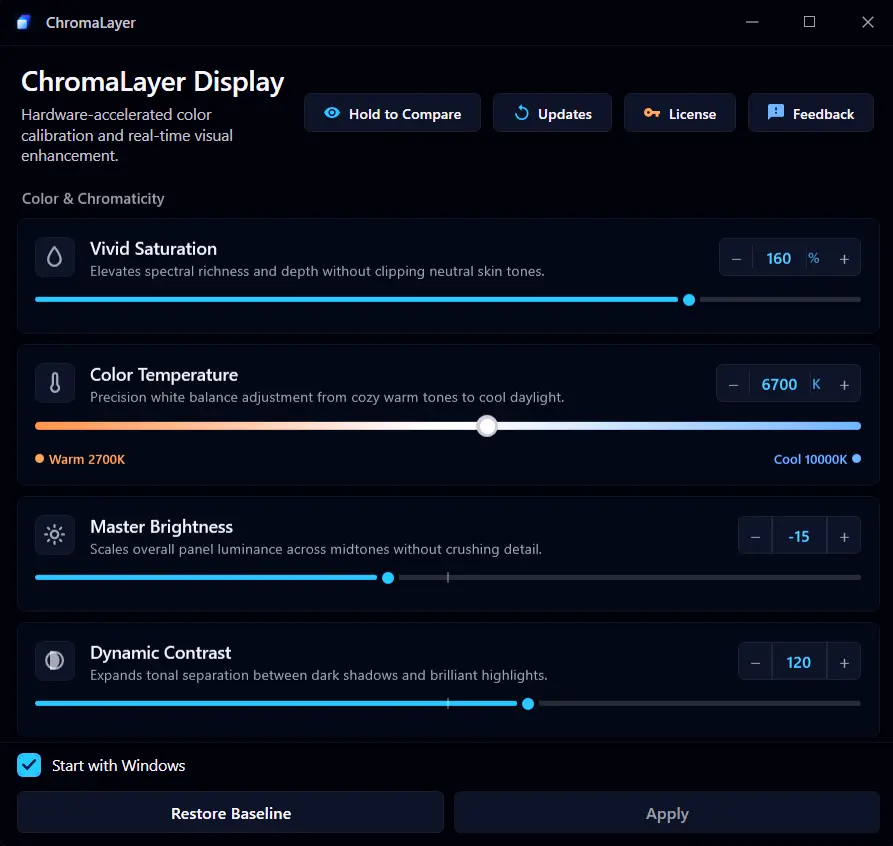
The real app window · one of its seven-control screens
01 · The brief
A laptop screen that stays how you set it
- Industry
- Consumer software, display tools
- Service
- Product design, build and release
Changing colours with Intel’s own software was frustrating, and it never gave full control over the screen. We wanted one tool that works on Intel, AMD and NVIDIA, not just one brand of graphics.
Colours look washed out or too yellow, Windows has no proper colour controls for the built-in screen, and the settings that do exist quietly reset after a restart.
Seven colour controls and five presets, from one small window in the system tray, on Intel, AMD and NVIDIA graphics, re-applied after every restart, sleep, sign-in and display change.
- 7colour controls, combined into one
- 5ready-made presets
- 9re-checks in the 25 seconds after each sign-in
- 0admin rights or drivers needed
02 · The centrepiece
Seven dials, one picture
Every control becomes one small piece of maths, and all seven are combined into a single change to the screen. Pick a preset, move any dial, then drag the divider.
A drawn test scene, rendered in your browser with the app's own colour maths and preset values. Move any dial to make your own. The app itself changes your whole screen.
- 0–200
- 2700–10000 K
- ±100
- 0–200
- ±180°
- 0–30
- 70–100
03 · The fight for your screen
Sign in, and Windows resets you
The hard part wasn't changing the colours. It was keeping them after Windows quietly undoes them.
- 0 s
You sign in
Your colours go on the moment the desktop appears, then get checked again a quarter-second and one second later.
- 15-25 s
Windows quietly resets them
Some time between 15 and 25 seconds after you sign in, Windows rebuilds part of its display pipeline and wipes the colours. Most tools lose here.
- Every ½ s
The app notices
For the first 30 seconds it checks twice a second whether the screen still shows your settings. After that, every 5 seconds.
- 25 s
Colours back, and they hold
Nine planned re-checks cover the whole window, after every sign-in, unlock, wake from sleep and display change.
04 · The hard parts
Lab notes
A colour tool that breaks your screen is worse than no tool. These are the three things it could never get wrong.
Greys stay grey
- Observation
- Boosting colour usually tints whites and greys too.
- Fix
- The vibrancy control is built so black, grey and white never shift, however far you push it.
- Result
- Richer colour, clean whites.
Restore always works
- Observation
- If a colour app crashes, you can be stuck with a strange screen.
- Fix
- One shortcut, the tray menu or the main window puts the original colours back, and they’re restored even if the app crashes.
- Result
- You can always get back.
Startup never waits
- Observation
- The window used to wait up to 10 seconds on a licence check.
- Fix
- Startup no longer waits on the network, and if the first colour change fails, it tries again up to 5 times.
- Result
- Colours on as soon as you sign in.
Want an app that
just keeps working?
Start with a free 20-minute call about your idea.
Book a free 20-minute call05 · Judgement
What we left out, on purpose
No overlay, no driver
It uses the same built-in Windows feature as its own accessibility colour filters, so it needs no admin rights and installs nothing deep in the system.
One screen, done well
No HDR, multiple monitors or ARM laptops in version one. The built-in screen had to be right first.
No health claims
No “eye health”, no “calibrated”. It makes the screen look better, and says only that.
06 · Result
- LiveAt chromalayer.app.
- Works onIntel, AMD and NVIDIA graphics, tested on each.
- Built inA 14-day free trial and licensing.
- UpdatesInstalls and updates through its own release channel.
Under the hood
How it's built, in plain words.
Under the hood
How it's built, in plain words.
- The tray appThe window, the sliders and the presets.
WPF - Settings and licensingSaves your profile safely and runs the trial.
Application layer - The colour mathsTurns seven sliders into one change. No Windows code, so it's fully testable.
ColorEngine · one 5×5 matrix - The screenApplies the change, watched by the watchdog and the sign-in and wake monitor.
Windows Magnification API
- Licence check · Cloudflare Workers
- Updates · GitHub Releases + Velopack
- One combined change per adjustment. Seven controls never fight each other. (single colour matrix)
- Colour maths kept apart from Windows. It can be tested on its own, and moved to another platform later.
- Never block startup on the network. Your colours don't wait for a server.
- Settings saved in one step. A crash mid-save can't leave a half-written file. (atomic write)
07 · Conclusion
What this build says about yours
Final readingChromaLayer
- i.
We solve for the real system
The hard part wasn't the seven controls. It was making them survive the way Windows actually behaves.
- ii.
We build for failure, not the demo
Startup, sleep, crashes, resets and recovery were part of the product from the beginning.
- iii.
We ship software we have to live with
ChromaLayer is our own live product, with licensing, updates and real users.
The same goes for your product: a clear scope, a new working build every week, and code you own.